
Start with the right tasks
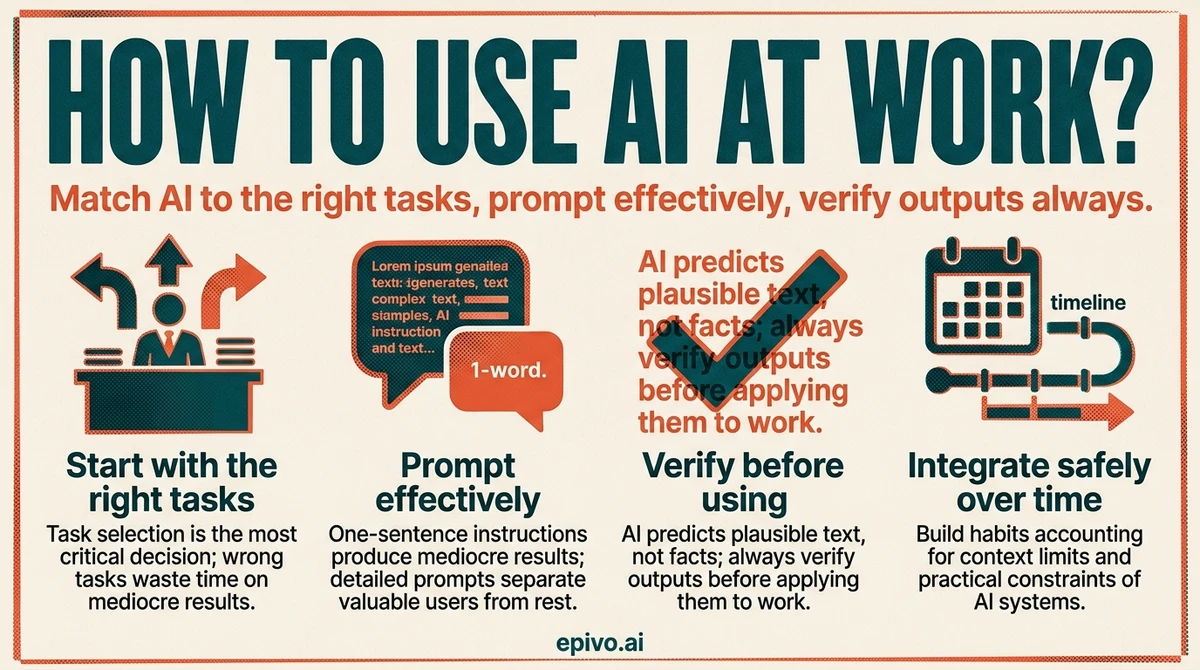
The single most important decision when learning how to use AI at work is which tasks you give it. Get this right and the productivity gains are immediate. Get it wrong and you waste time fixing AI mistakes instead of saving time with AI assistance.
AI performs well on tasks that involve generating, transforming, or structuring language. Drafting emails, meeting summaries, status reports, proposals, and job descriptions are the clearest wins. So is brainstorming — give the AI a problem or goal and ask for ten approaches; even if eight are unusable, two will spark ideas you would not have found alone. Structuring messy information into a coherent outline or document is another strong use case. AI handles the scaffolding; you bring the judgment.
AI performs poorly on tasks that require precision, verified facts, or judgment grounded in context it does not have. Do not rely on AI to retrieve specific statistics, legal or financial details, or recent information without checking every claim. Do not use it to make nuanced personnel decisions, assess political dynamics in your organisation, or produce work that will be published without human review. The failure mode is not dramatic — AI gives plausible-sounding answers regardless of whether they are accurate.
A practical starting point: write down the five tasks that consume the most time in your average week. Mark each one as language-heavy or precision-dependent. Start with the language-heavy ones. Build the habit there before expanding to more complex use cases.
Prompt effectively
Most people give AI a one-sentence instruction and accept whatever comes back. This produces mediocre results. Learning how to prompt AI effectively is what separates professionals who get real value from AI from those who dismiss it after a few tries.
Four habits make an immediate difference.
First, give context. AI does not know who you are, what your organisation does, or who will read the output. A prompt like "write a project update" produces generic text. A prompt like "write a two-paragraph project update for a non-technical executive audience, covering that the launch has been delayed two weeks due to a supplier issue and that the new timeline is confirmed" produces something close to usable. The additional context costs thirty seconds and saves ten minutes of editing.
Second, specify format and length. If you want bullet points, say so. If you want a one-page summary, say so. If you want formal language suitable for a board report, say so. AI defaults to a middle register that fits no specific context particularly well.
Third, give examples when quality matters. Paste in a paragraph of your own writing if you want the output to match your style. Show a previous document if you want to match a structure. Showing is faster than explaining.
Fourth, iterate rather than accept the first output. The first draft is a starting point, not a finished product. Ask for revisions — make it more concise, make the opening stronger, change the tone — instead of rewriting from scratch yourself. You can read a detailed guide on how to prompt AI effectively for more structured techniques.
A concrete example: instead of "write a client email about the deadline", try "write a professional email to a client explaining that their project delivery will be delayed by one week due to additional testing requirements. Keep it under 150 words, apologetic but confident in tone, and end with a specific new date of March 28." The second prompt takes longer to write and produces output that requires far less editing.
Verify AI output before you use it
Understanding how AI generates responses changes how you treat its output. AI language models do not retrieve facts — they predict text. They produce responses that are statistically plausible based on their training data. This is why they can write fluently about topics they have no accurate knowledge of. Understanding how ChatGPT generates its responses makes the verification habit feel less optional.
Hallucination — the term for when AI generates confident, fluent, incorrect information — is not a bug that will be fixed. It is a property of how these models work. AI can invent citations, misstate statistics, get dates wrong, and describe studies that do not exist. The text sounds authoritative regardless.
The verification workflow for professional use is straightforward. For any claim you intend to use externally — in a report, proposal, client communication, or published content — check the primary source. Do not accept AI's characterisation of a study; find the study. Do not use a statistic without confirming the original source. For internal drafts and low-stakes uses, a lighter check is fine: read for obvious errors and use your professional judgment on anything that will reach a decision-maker.
Specific categories that always require verification: statistics and percentages, quotes attributed to specific people, legal or regulatory claims, historical dates and facts, and any claim with a specific number in it. These are the categories where AI hallucinations are most common and most damaging if they pass through undetected.
The practical rule: treat AI output the way you treat work from a very capable but inexperienced junior colleague. They can produce a strong first draft. You review it before it leaves the team.

Did you know?
-
Generative AI could automate tasks accounting for 60–70% of employee time today, with knowledge work seeing the largest impact across industries.
McKinsey Global Institute — The Economic Potential of Generative AI -
In controlled studies, professionals using AI completed tasks 25–40% faster than control groups, with the largest gains in drafting and summarisation tasks.
MIT Sloan Management Review — Using AI at Work -
Adoption is uneven: most organisations have employees using AI individually, but fewer than one in five have a structured approach to AI integration at team or organisation level.
McKinsey Global Institute — The Economic Potential of Generative AI
Manage context and integrate safely
Using AI effectively over time requires understanding a few practical constraints — and building habits that account for them.
Context windows are the memory limit of an AI session. Everything you have typed in a conversation, plus the AI's responses, counts against this limit. In a long session, early instructions and context can effectively fall out of the model's working attention. For important standing instructions — your role, your audience, specific constraints — restate them periodically rather than assuming the AI remembers them from the start of a long conversation. Some tools let you set a persistent system prompt or profile; use it.
Data privacy is the most important risk to manage when using AI at work. General-purpose AI tools send your input to external servers. Most major providers use your inputs to improve their models unless you opt out, and terms of service vary. The practical rules: do not paste client names, contract terms, personal employee data, confidential financial figures, or unreleased product details into a consumer AI tool. Use your organisation's enterprise AI subscription if one is available — these typically include data processing agreements and do not use inputs for training.
Building AI into regular workflows is where the compounding gains come from. The professionals who get the most value are not the ones who use AI occasionally for big tasks — they are the ones who route a class of regular tasks through AI as a default. Pick one recurring task, establish a prompt template for it, use it consistently for two weeks, and refine. Then pick the next task. This incremental approach builds skill and habit without disrupting existing work.
Finally, know when not to use AI. Sensitive conversations, complex negotiations, decisions that require accountability, and creative work that needs your distinctive voice are all better done by you. AI is a drafting and structuring tool. Judgment, relationship, and authorship remain yours.

Frequently asked questions
- What tasks is AI best at in a work context?
- AI performs best on language-heavy tasks with low precision requirements: drafting emails, reports, and proposals; summarising documents and meetings; brainstorming options; and structuring information. It performs poorly on tasks requiring verified facts, complex reasoning, or judgment grounded in organisational context.
- How do I write better AI prompts for work?
- Give context (who you are, who reads the output), specify format and length, provide examples when tone or style matters, and iterate rather than accepting the first draft. A prompt with thirty more words typically saves ten minutes of editing.
- Is it safe to use AI with confidential work data?
- Not with consumer tools. Most general-purpose AI services send inputs to external servers and may use them for training. Do not paste client data, contracts, or internal financial details into a consumer AI tool. Use your organisation's enterprise subscription, which includes data processing agreements.
- What are the main risks of using AI at work?
- The three main risks are: hallucination (AI inventing plausible-sounding incorrect information), data privacy (sending sensitive information to external systems), and overreliance (publishing AI output without review). Each is manageable with the right habits.
- Which AI tools are best for work?
- For most professional use cases, ChatGPT, Claude, and Microsoft Copilot are the leading options. Enterprise versions of these tools are preferable to consumer versions for data privacy. The best tool is the one your organisation supports with a data processing agreement in place.
- How do I know when not to use AI at work?
- Avoid AI for sensitive conversations, decisions requiring clear accountability, complex negotiations, and work where your distinctive voice is the value. If the output being wrong would be damaging and hard to catch, the task needs a human.