
Deploy to a real server from day one
Running your project locally feels safe, but it creates a false sense of progress. Your software works on your machine, inside your specific environment, with your particular configuration. The moment you try to share it with anyone else, everything breaks.
My approach is different. On the first day of any project, I ask Claude to set up a real server. Not a local Docker container. Not a development environment. A real, internet-accessible server where the application runs for actual users.
This costs about $7 per month on platforms like Render or similar hosting services. That is less than a cup of coffee per week, and it eliminates an entire category of problems that local development creates.
I do not pick the hosting platform myself. I tell Claude what I am building, what my budget is, and what my constraints are. Claude recommends the platform that fits. For one project it suggested Render. For another, a different provider. The point is that you state your goals, not your tools. Claude has broader knowledge of hosting platforms than any individual developer, and its recommendation will be based on your specific situation rather than habit or brand loyalty.
Once the server is running, every change you make goes live immediately. You see real behaviour, real performance, real errors. That feedback loop is worth more than any amount of local testing.
Git push deploys and CI/CD automation
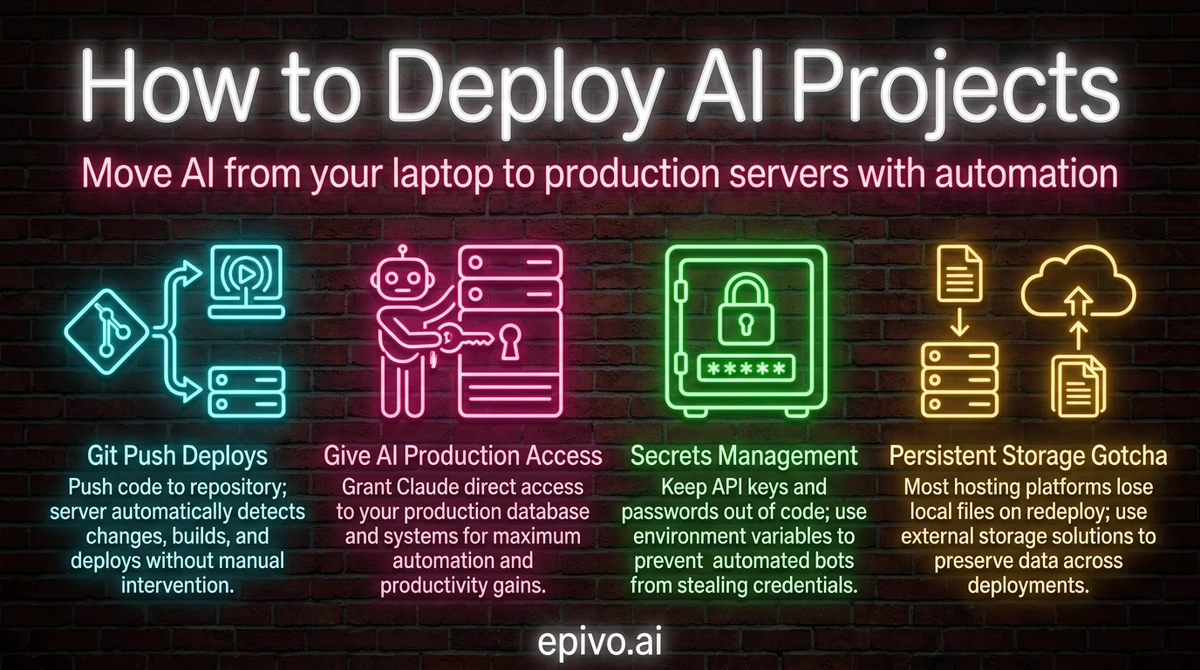
The single most important deployment pattern to understand is git push deploys. Here is how it works: you push your code to a git repository, and the server automatically detects the change, builds your application, and deploys it. No manual steps. No copying files. No SSH commands.
This is called CI/CD — continuous integration and continuous deployment. Services like GitHub Actions handle the automation. When Claude makes changes to your project and commits them, you push to the repository and the deployment pipeline triggers automatically.
In my projects, this workflow is straightforward:
- Claude makes code changes and commits them with a clear description
- I push the commit to the repository
- The hosting platform detects the new commit and starts deploying
- Within a few minutes, the updated application is live
You do not need to understand how CI/CD works internally. You need to know that it exists and that Claude can set it up for you. Tell Claude you want automatic deployments triggered by git push, and it will configure the pipeline for your hosting platform.
This pattern also means you have a complete history of every change. If something breaks, you can see exactly which commit caused it and roll back. That safety net is far more valuable than manually reviewing every change before deployment.

Database migrations through version control
Your application's database structure — the tables, columns, and relationships that store your data — needs to change as your project evolves. New features require new tables. Bug fixes sometimes require column changes. This is normal.
The critical rule is that database changes must live in your git repository, not in your head or in some manual process. Every structural change to your database should be defined in a migration file that is committed alongside your code. When you deploy, these migrations run automatically.
Why does this matter? Because if you ever need to deploy your application on a brand new server — whether because you are scaling, recovering from a failure, or simply moving to a different hosting provider — the entire database structure gets created automatically from those migration files. Nothing is lost. Nothing depends on someone remembering to run a command.
Claude handles this naturally. When it adds a feature that requires a new database table, it creates the migration file as part of the same change. The migration is committed, pushed, and applied on deploy. You do not need to understand SQL or database administration. You need to understand the principle: database changes are code, and code lives in version control.
Tools like Alembic for Python or similar migration frameworks for other languages track which migrations have been applied and which are pending. Claude picks the right tool for your stack. The gold standard is simple: deploy from scratch, get a complete database. If your project cannot do that, your migrations are incomplete.

Give your AI full production access
This is where most people hesitate, and where the biggest productivity gains live. If you want to know how to deploy AI projects effectively, you need to give Claude direct access to your production environment.
That means:
- SSH keys so Claude can connect to your server and run commands
- API access so Claude can check health endpoints and read application state
- Log access so Claude can read server logs and diagnose issues without you copying and pasting anything
- Git access so Claude can check deployment history and compare what is running against what was committed
Why? Because every time you act as a middleman between Claude and the production environment, you slow things down. Copy-pasting error logs into a chat window is a waste of time. Reading server output and trying to describe it to Claude introduces errors. The goal is to get yourself out of the loop so Claude can troubleshoot autonomously.
When something goes wrong on one of my projects, I tell Claude there is a problem and it investigates directly. It reads the logs, identifies the error, writes a fix, and deploys it. My role is oversight, not execution.
The safety concern is natural: what if Claude breaks something? The answer is process architecture. You do not prevent errors by restricting access. You prevent errors by having automated reviews, change requests, and logging systems that catch issues before and after deployment. Restricting Claude's access to production does not make your system safer — it makes you the bottleneck.

Production access handoff
You must have full access to production servers for checking logs and troubleshooting etc. with minimal need for my intervention. Document everything in a skill or memory.
Claude will ask for exactly what it needs — SSH keys, API tokens, log endpoints — and guide the setup step by step. Usually takes a few minutes. Once documented in a skill, every future session inherits the access pattern automatically.
Secrets management — keeping credentials out of your code
Your application needs API keys, database passwords, and service credentials. These secrets must never appear in your source code or git repository. If they do, automated bots will find them — often within seconds of a push to a public repository. GitGuardian detected 12.8 million secrets leaked in public GitHub repositories in 2024 alone.
The solution is a three-layer system that handles secrets at every stage of development:
Layer 1: The .env file. During local development, all secrets live in a .env file in your project root. One line per secret, plain text. This file exists only on your machine.
Layer 2: The .gitignore file. Your .gitignore contains an entry for .env, which tells git to never track or commit it. This prevents secrets from reaching the repository. You should also commit a .env.example file with the same variable names but placeholder values — so Claude and any collaborators know which environment variables the project needs without seeing the real values.
Layer 3: Server-side environment variables. On your hosting platform, you configure each secret in the platform's environment panel. Render, Railway, Fly.io — they all have a settings page where you add key-value pairs that are encrypted and injected at runtime.
Three layers. Local, excluded, and live. Break any layer and secrets leak.
Once your implementation is complete, run a security audit. Ask Claude to inspect every file, every config, every API call for hardcoded secrets, missing .gitignore entries, unencrypted storage, and exposed endpoints. Run this before your first commit and again before go-live.
If a key does leak, rotate it immediately: update the value in your hosting platform's environment panel and revoke the old key at the provider. GitGuardian found that 90% of leaked secrets are never rotated after discovery — the vulnerability persists for months or years.
For projects with multiple environments — staging and production — ask Claude about Render Blueprints or infrastructure-as-code templates that replicate environment variables automatically across servers.

Security audit
Do a full security audit of the data handling in this implementation. Are credentials stored safely? Is any sensitive data exposed? Is there anything that should not be committed to the repository?
Run this before your first commit and again before go-live. Your job is to ask whether the implementation is safe. Claude's job is to find what you missed.
Production readiness — the questions that prevent outages
Before you go live with real users, there is a set of questions you should ask Claude. These are not yes-or-no questions. You are asking Claude to design specific answers for your project's architecture and scale.
Monitoring and alarms
Ask: what production monitors and alarms are needed to ensure full uptime for this application? Claude will typically recommend uptime checks (services like Better Uptime or UptimeRobot, many with free tiers), error rate alerts (Sentry has a free tier), and latency monitoring (often built into your hosting platform). You do not need to know which tools exist. You need to ask the question.
Scaling
Ask: will this solution be able to scale and handle 100,000 users? What would need to change? Claude maps your current architecture against the target load. It identifies bottlenecks — database connection pool limits, synchronous jobs that will time out, missing caching layers. The answer is specific to your project.
Zero-downtime deployment and rollback
Ask: can I deploy new versions and roll back without downtime for the users? What does the rollback procedure look like? Most modern hosting platforms handle basic zero-downtime by spinning up the new version before terminating the old one. But the deeper question is whether your database migrations are reversible and whether you have a tested rollback path.
Centralized logging
Ask: please ensure that there is detailed centralized logging to the database so that we can troubleshoot. Logging to the database rather than to files is a good practice early in any project — log files on container platforms vanish on every deploy, and disks can fill up. Follow up with: ensure that the database does not run full with logs. Suggest a solution. Claude designs a rotation policy that prunes old entries automatically.
File storage
Ask: where should we store files? Small configuration files can sit in git. But for user uploads, generated reports, or any data that grows over time, Claude will recommend the right storage approach — typically object storage like Cloudflare R2 or AWS S3, which survives deploys and scales independently.
Backups
Ask: what backup solution should we have, so that we have daily, weekly, monthly, and yearly backups? Where will they be stored? How will I be able to verify that it works in the admin UI? How will I restore the system from a backup? Claude designs the backup schedule, recommends storage (often the hosting platform's managed backup service plus an external copy), and builds verification steps you can check from your admin dashboard.
The decision quality question
When Claude presents multiple options for any of these — and you do not know which to choose — ask one follow-up: what is the best long-term solution for this project in your view? This forces Claude to commit to a recommendation rather than hedging with tradeoff lists. It cuts decision paralysis. The AI should advocate for the best path, not just enumerate possibilities.
Your role across all of these questions is the same: ask the right questions and let Claude design the right answers for your specific project. You do not need to be an infrastructure expert. You need the discipline to ask before you ship.

Production readiness checklist
What production monitors and alarms are needed to ensure full uptime? Will this solution scale to handle 100,000 users? Can I deploy and roll back without downtime?
Run through these questions before every launch. Follow up with questions about logging, backups, and file storage. When Claude gives you options, ask: "What is the best long-term solution for this project in your view?"
Persistent storage and platform gotchas
One lesson that catches everyone off guard: most hosting platforms do not include persistent disk storage by default. When your application redeploys, any files written to the local filesystem disappear. Your database survives because it runs as a separate managed service, but uploaded images, generated reports, or cached files vanish on the next deploy.
This is not a bug. It is how modern container-based hosting works. Each deploy creates a fresh environment from your code. If your application needs to store files that persist between deploys, you need to explicitly configure persistent storage or use an external service like a CDN or cloud storage bucket.
Claude knows this and will set up the right storage solution for your needs. But you need to understand the principle so you can catch it early. If you are building something that handles file uploads, user-generated content, or any data that lives outside the database, ask Claude about persistent storage from the start.
The broader lesson here applies to learning how to deploy AI projects in general: let Claude pick the technology. State your objectives and constraints clearly — what you are building, who it is for, what your budget is — and let Claude recommend the right stack. My projects use different combinations of technologies because each project has different needs. PostgreSQL for relational data, Redis for task queues, Cloudflare for static assets. I did not pick any of these. I described what I needed, and Claude recommended what fits.
You do not need to become an expert in cloud infrastructure. You need to clearly describe what success looks like and trust Claude's technical judgment. Use Socratic questions to validate the recommendations —what are the tradeoffs? will this scale? what happens when the server restarts? — but let Claude drive the technical decisions.
Integrating third-party services you have never used before
When building a product, you inevitably need third-party services — Stripe for payments, UptimeRobot for monitoring, SendGrid for email, or dozens of others. You do not need to know how any of them work. Ask your AI: What is the best way to handle this function in my solution? It recommends a provider and gives you a URL.
Sign up at that URL, share a screenshot of what you see, and say "guide me." The AI tells you what to click and what to enter, step by step. Services you have never touched before get configured in minutes.
After setup, say: I want you to be able to connect to this service and manage things for me. The AI walks you through copying an API key or token — takes about as long as copying a password. Then say: "Set up a skill for managing production." The AI saves the connection knowledge permanently, so every future session already knows how to check logs, fix configuration, and manage settings across all your services.
This pattern — ask AI for a recommendation, sign up, screenshot, guide me, give access, create skill — works for virtually any third-party service. It means that services you have never heard of get integrated into your solution in a matter of minutes, not days.

Frequently asked questions
- How much does it cost to deploy an AI project to production?
- Basic hosting starts at around $7 per month on platforms like Render, Railway, or Fly.io. A managed database adds another $7-15 per month. For most early-stage AI projects, you can have a fully deployed production environment for under $25 per month — far cheaper and simpler than running a local development environment.
- Do I need to understand DevOps to deploy AI projects?
- No. You need to understand the principles — git push deploys, database migrations as code, persistent storage — but Claude handles the actual configuration. Tell Claude what you want (automatic deployments, database that survives redeploys, file storage for uploads) and it will set up the appropriate infrastructure for your hosting platform.
- Is it safe to give AI full access to production servers?
- Safety comes from process architecture, not from restricting access. Automated reviews, change requests, mandatory changelogs, and comprehensive logging provide far better protection than manual gatekeeping. Restricting Claude's access forces you to be the bottleneck and actually increases risk because you may misinterpret or miss errors that Claude would catch directly.
- What happens if a deployment breaks my application?
- Every change is tracked in git, so you can always roll back to a previous working version. Most hosting platforms support instant rollbacks. CI/CD pipelines can also include automated health checks that detect failures and revert automatically. The combination of version control and automated deployment makes recovery straightforward.
- Should I use Docker for deploying AI projects?
- Not necessarily. Docker adds complexity that may not be needed for your project. Many hosting platforms handle containerisation automatically — you push your code and they build and run it. Let Claude recommend whether Docker is appropriate based on your specific project requirements rather than adopting it because it is popular.